
What the published report includes
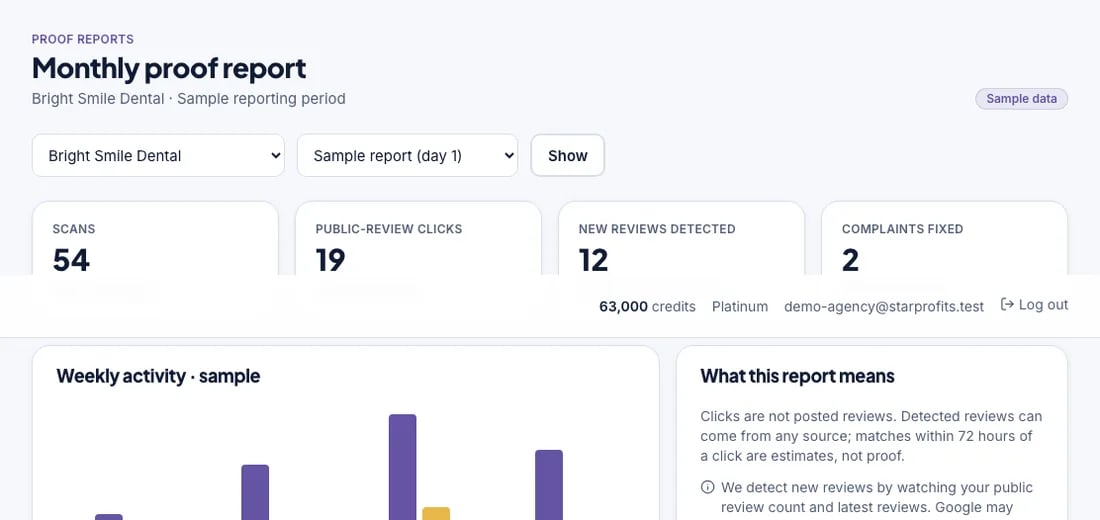
StarProfits AI’s seller overview describes a monthly report showing scans, public-review clicks, newly spotted reviews and complaints fixed. It also describes agency branding and a client portal. The official report screenshot is labelled as using sample data, which should remain clear wherever that image is shown.
A report can give an owner a repeatable conversation about the work performed. Its value depends on understandable definitions and a consistent reporting period. The workflow guide explains how reporting follows the review kit and customer journey.
Keep the activity measures distinct
| Reported item | What to clarify |
|---|---|
| Scans | What counts as a scan and how repeated scans are handled. |
| Public-review clicks | Which customer action records the click and which destination it opens. |
| New reviews spotted | How the software identifies new listing activity and how often it checks. |
| Complaints fixed | Who marks a complaint resolved and which evidence supports closure. |
A click records an action in the journey. A published review depends on the customer completing their own contribution and the destination platform handling it. Avoid presenting those two counts as interchangeable.
Use recovery reporting to track follow-through
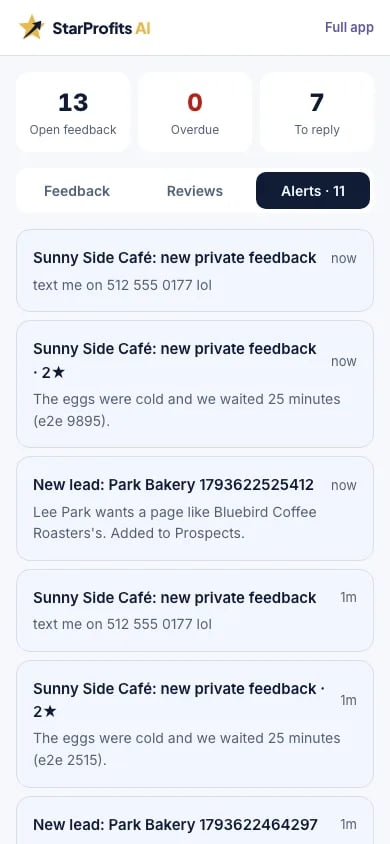
The seller describes a recovery desk where private complaints receive an owner and a deadline, with owner alerts for private feedback. A report becomes more useful when the service team agrees what those assignments mean in practice.
For example, an internal service routine might distinguish a complaint received, an owner contacted, an action agreed and the issue closed. That sequence is an editorial operating suggestion. Confirm the actual product statuses before promising them in a client contract. The review-page guide explains where private feedback appears within the rating-adaptive journey.
Explain changes without overstating attribution
Write down the start and end dates, any change in the request routine and the business context. A busier month, a new location, a mailing change or ordinary service improvements may affect feedback activity. A dashboard alone does not isolate which factor caused the change.
Use the report to discuss the actual actions the business took and the activity observed. Revenue, retention and search visibility require their own evidence. The reviewed seller sources do not establish a guaranteed conversion rate, number of new reviews or return on the agency’s fee.
A worked example of report interpretation
Consider a hypothetical report with 80 scans, 24 public-review clicks and six newly spotted reviews in the same period. Those invented numbers illustrate interpretation only. The public-review click count is 30% of the scan count, but that ratio is not automatically a customer conversion rate. It depends on the software’s definitions and whether repeated interactions are counted.
The six newly spotted reviews should not be described as six reviews caused by the 24 clicks. Some customers may have reached the listing another way, and a customer who clicked may not have completed a review. The report would need a documented attribution method before supporting a stronger connection between those counts.
A more useful explanation tells the owner what was observed, what changed in the request routine and what needs checking next. For example, staff may have moved a counter card or corrected a link during the period. Keep those actions in a service log. The request guide and setup guide help connect the numbers to the work performed.
Make reporting periods comparable
Use the same business identity and clearly stated date range for each report. A full month and a partial setup period are not directly comparable without explanation. Likewise, a business changing its hours, customer volume or printed placements can see different activity for reasons beyond the software.
Before discussing a trend, ask how often the product checks for new reviews, how repeated scans are handled and what event records a public-review click. The seller overview names the measures but does not document every counting rule. If a definition is unclear, label the uncertainty instead of presenting the figure as a precise measure of individual customers.
Keep the raw observation and your interpretation separate. “The report recorded more clicks” is narrower than “the campaign improved the business.” A client can still find the first statement useful when it is paired with actual service actions. Our strengths and limitations guide explains why a connected report is valuable while remaining dependent on accurate setup and responsible interpretation.
Turn the report into a short client meeting
Begin with the work completed: page changes, request-material updates, reply approval and complaint follow-up. Then walk through the recorded measures using definitions the owner understands. Finish with one or two actions for the next period, such as checking a low-use placement or clarifying who receives feedback.
For private issues, discuss the action taken and whether the responsible person confirmed closure. Avoid exposing unnecessary customer details in a broadly shared report. A complaint marked resolved does not establish that the customer changed a public review or that the business avoided a loss. The feedback journey guide explains how those issues enter the operating process.
Agree who can view an embedded report or portal and how it will be shared. The agency feature description includes an embeddable report, but the exact access controls deserve a check in the account. The agency guide and privacy checklist cover those handoffs. A report is most useful when the owner can connect its observations to a clear next decision.
Define a useful monthly deliverable
A concise reporting meeting can cover the date range, the request channels used, the reported counts, the unresolved feedback and the next action. Agree who will check the listing, review replies and respond to an alert before the next report. Compare that responsibility with the permissions in the agency and commercial-license guide.
If sending volume changes, review the messaging setup and costs alongside the report. Our main StarProfits AI review covers how reporting fits the overall offer. These feature descriptions were checked on November 8, 2026, before the advertised public launch.
Common questions
What does the monthly report show?
The seller describes scans, public-review clicks, new reviews spotted and complaints fixed, with agency branding. Its published screenshot uses sample data.
Does a public-review click prove a review was posted?
A click shows a step in the customer journey. Confirm published reviews separately and ask how the software detects newly appearing reviews.
Is a public-review click the same as a completed review?
A click records a step toward a destination. Publishing requires the customer to complete their own contribution and the review platform to handle it. Newly spotted reviews may also come through other routes. Keep the counts separate unless a documented attribution method supports a more specific connection.
What makes two reporting periods comparable?
Use consistent business identity, dates and metric definitions, and explain changes in placements or operating routine. A partial setup period and a full month need context. Ask how repeated scans and review checks are counted before presenting a change as a precise trend in individual customer behavior.
Sources and verification
Product facts and launch offers checked on November 8, 2026. Seller demonstrations and published terms support the factual descriptions. Practical checklists are our editorial analysis.