
What the connector is described as doing
The StarProfits AI overview describes a Claude and ChatGPT connector with OAuth sign-in. Its examples include checking which reviews need a reply, drafting replies and sending review requests. The seller says sending requests requires a confirmation step and that the connector, REST API, webhooks and Review Stories are included in every plan.
The published launch messages add that connecting Claude or ChatGPT depends on the buyer’s plan with that service. Software entitlement and access to an external assistant should therefore be checked separately. The pricing guide covers the advertised StarProfits AI packages.
Map the information each task needs
Before connecting a client, list the data needed for the intended task. Finding reviews may involve a business listing and review text. Drafting a reply adds the prompt and generated answer. Sending requests can involve customer contact details and the recipient selection.
This is a planning model for evaluating the integration, rather than a verified account of the product’s internal architecture. Ask which information leaves the application, which connected services receive it, and whether the account can limit access to a particular business. Keep unnecessary confidential details out of prompts.
Questions for sign-in and API access
- Which permissions appear on the OAuth consent screen?
- Can the owner disconnect the assistant and revoke access?
- How are API keys created, rotated and revoked?
- What events can trigger a webhook, and what fields does it send?
- Who can read private feedback and customer contact details?
- How are client workspaces separated for agency users?
The official overview mentions API keys, webhooks and developer documentation, but the reviewed material does not establish every answer. Request the current documentation before designing an automation or promising an integration to a client.
Inspect approval before a message goes out
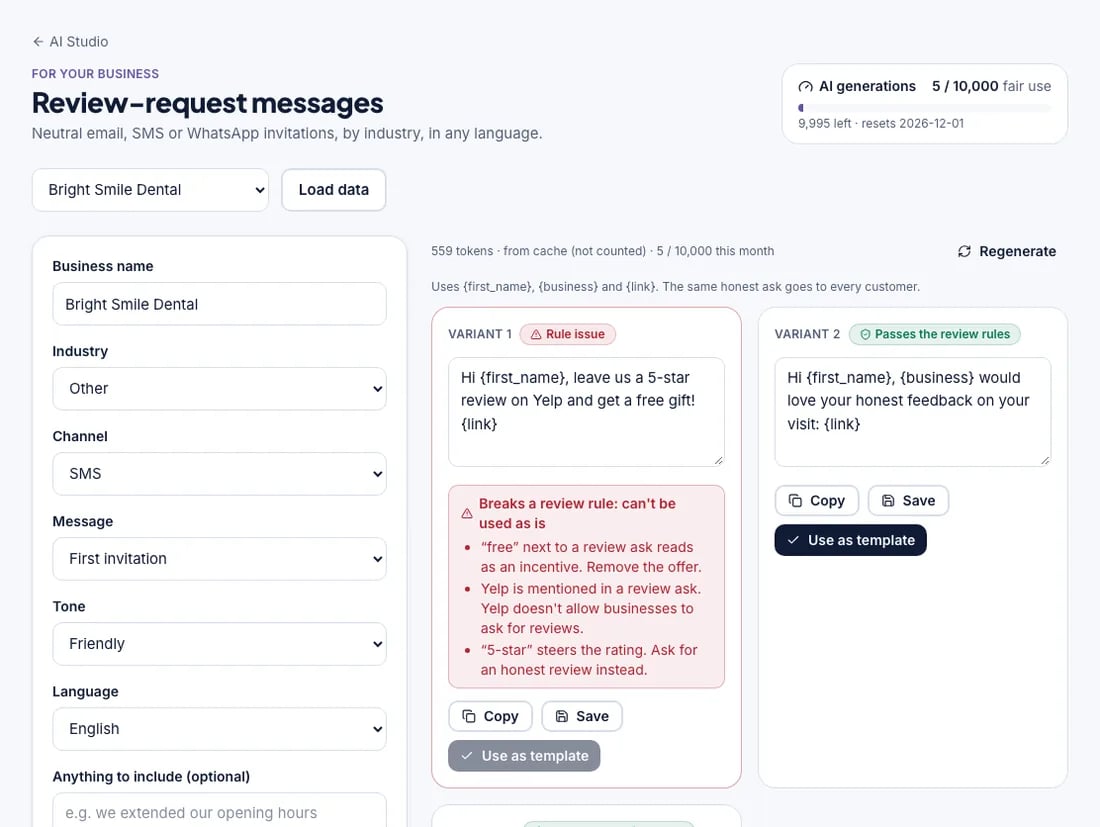
The seller describes a confirmation showing who will receive review requests and how many will be sent. Verify that confirmation with a recipient you control before using a real customer list. Check the selected business, channel, recipients and request text.
Reply drafting has a different publishing path. The seller says the AI prepares the reply and opens the Google review so the user can paste and post it. The AI review-reply guide explains that distinction, while the messaging guide covers the separate Twilio requirement for SMS.
Compare reading, drafting and sending as different permissions
| Task | Information involved | Permission to inspect |
|---|---|---|
| Find reviews awaiting a reply | Business identity and review records | Which businesses and records the connection can read |
| Draft a response | Review text, prompt and generated wording | Where the text is processed and who can see it |
| Send review requests | Recipient details, message and channel | What the confirmation authorizes and how sends are recorded |
| Trigger a webhook | Event payload and destination | Which fields leave the application and how delivery is checked |
This table is an evaluation model, not a verified architecture diagram. The public overview confirms the advertised connector and API features but does not supply every data-flow detail. Ask for current developer documentation and inspect the actual connection screen before making an automation part of a client service.
Start a connection with a controlled task
Begin with a business you are authorized to manage and a narrowly defined task. Reading which reviews need attention is a different check from sending messages. Confirm the selected business and the information displayed before adding a recipient action. Use contact details under your control for any initial send verification.
The seller describes confirmation before sending review requests. Inspect what that confirmation actually shows: business, channel, recipient selection and message count. If it does not provide enough information to identify the action, resolve that uncertainty before approving a real customer send. A confirmation step is useful only when the operator understands what is being authorized.
Also check how to disconnect the service and stop an unfinished workflow. Ask how failures and repeated requests are handled, rather than assuming that a successful first run proves every later action is reliable. The messaging guide covers recipient and delivery checks, while the reply guide explains the separate copy-and-post path for Google responses.
Questions that become important across client workspaces
An agency needs to understand whether an operator or integration can reach more than one client’s records. Ask how workspace permissions are set, whether a connection can be limited to a specific business and what a client can see in its portal. The existence of separate branded workspaces does not by itself establish every underlying access boundary.
Keep private feedback and public review text distinct in the service routine. An issue sent privately to an owner may contain information that should not be reused in a public reply, a social card or an assistant prompt. Limit the working information to what the task needs and obtain the product’s actual data terms before introducing sensitive customer details.
Request the current retention, deletion, export and service-provider documentation. The original overview’s placeholder links left those matters unresolved at our dated check. Our agency guide connects those questions to client ownership and exit planning. A feature entitlement in every plan is useful information, while the suitability of a particular data use still depends on the actual permissions and terms.
Obtain the actual data terms
At our November 8, 2026 source check, the overview’s Privacy Policy and Terms of Service footer links pointed to unavailable placeholders. We could not verify the product’s retention period, deletion process, subprocessor list, storage location or full contractual privacy terms from those links.
Ask support for the current documents and any agreement needed for your use of customer information. Check permissions for republishing reviews using the widgets and social-card guide. Our main review brings these source limitations together with feature and offer details.
Common questions
Is the Claude and ChatGPT connector advertised in Basic?
The seller says the connector, API and webhooks come with every plan. Access to Claude or ChatGPT can depend on the buyer’s separate plan with that service.
Have the full product privacy terms been verified?
The policy and terms links on the reviewed official overview pointed to unavailable placeholders on November 8, 2026. Obtain current documents from the seller before connecting sensitive customer data.
Does an OAuth sign-in establish the full privacy policy?
OAuth describes an authorization mechanism. It does not by itself establish retention periods, deletion procedures, storage location or every service receiving the data. Inspect the actual permissions and obtain the current product documents before deciding whether a particular customer-data use is appropriate.
Does an advertised API prove a native CRM integration exists?
An API and webhooks can support connections, but they do not establish a ready-made integration with every CRM. Verify the endpoint, event fields, authentication, error handling and maintenance needed for the connection you intend to use. The public overview does not settle all those implementation details.
Sources and verification
Product facts and launch offers checked on November 8, 2026. Seller demonstrations and published terms support the factual descriptions. Practical checklists are our editorial analysis.