
Prepare the business details first
Before configuring a business, gather the correct public listing, the owner-approved logo, contact details and the name of the person who will handle feedback. Confirm that you have permission to use the brand and contact its customers. For an agency, agree on who can approve reply drafts and receive private complaints.
This is an editorial setup checklist based on the seller’s described onboarding. It does not reproduce an independently tested account walkthrough. The main review explains the source evidence and publisher-reported experience.
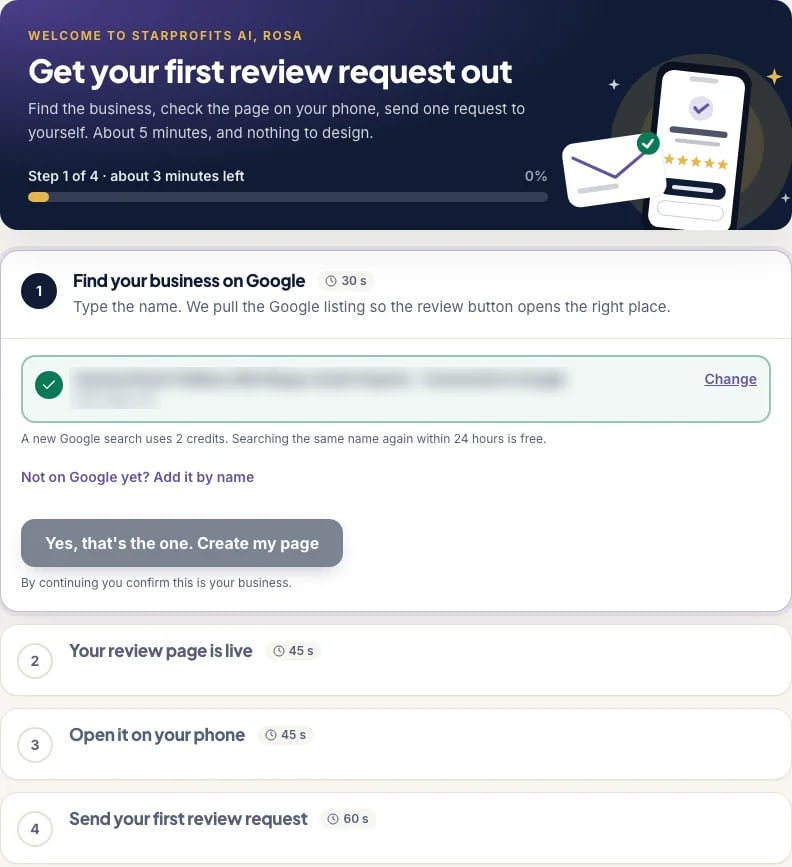
Follow the four advertised onboarding stages
The seller calls its guided start Live in 5. It describes four stages, finding the business on Google, making the review page live, opening it on a phone and sending the first review request. The stated duration is a seller demonstration, and your permissions, account configuration and review process can require more time.
- Verify the listing. Match the name, location and business category before generation.
- Review the page. Check the logo, contact destination and public-review link.
- Open it on a phone. Inspect the actual customer experience and scan the QR.
- Send a controlled request. Use your own address or another authorized recipient to inspect the received message.
Check every feedback path
Test the page with no rating and with both low and high ratings. The advertised adaptive flow opens private feedback first for low ratings and shows a smaller public-review button below. High ratings lead to a short Google countdown with a way to stay and contact the owner privately.
The seller says the adaptive layout can be switched off so both options appear side by side at every score. Decide on the configuration deliberately and review it with the owner. Our customer-path guide explains why visibility alone does not settle every policy question.
Prepare the first request and reply process
Use a neutral invitation that welcomes genuine feedback from customers with different experiences. Verify the sender identity, business link and the way a recipient can stop further messages. If SMS is part of your plan, confirm the separate Twilio setup and costs before sending. The messaging guide covers those dependencies.
Assign a person to inspect AI drafts for factual accuracy and personal information. The advertised Google workflow copies a draft and opens the review for the operator to paste and post. Follow the reply checklist before handing this work to a client or staff member.
A first-business acceptance checklist
Use an acceptance check before calling a business ready. Start with the identity shown on the page, the destination of its public-review link and the contact route used for private feedback. A working page for the wrong branch can look convincing while sending customers somewhere the owner did not intend.
- Open the customer page using a phone rather than relying only on the editor preview.
- Confirm the business name, location, logo and public-review destination.
- Inspect the experience before choosing a score and after a low or high score.
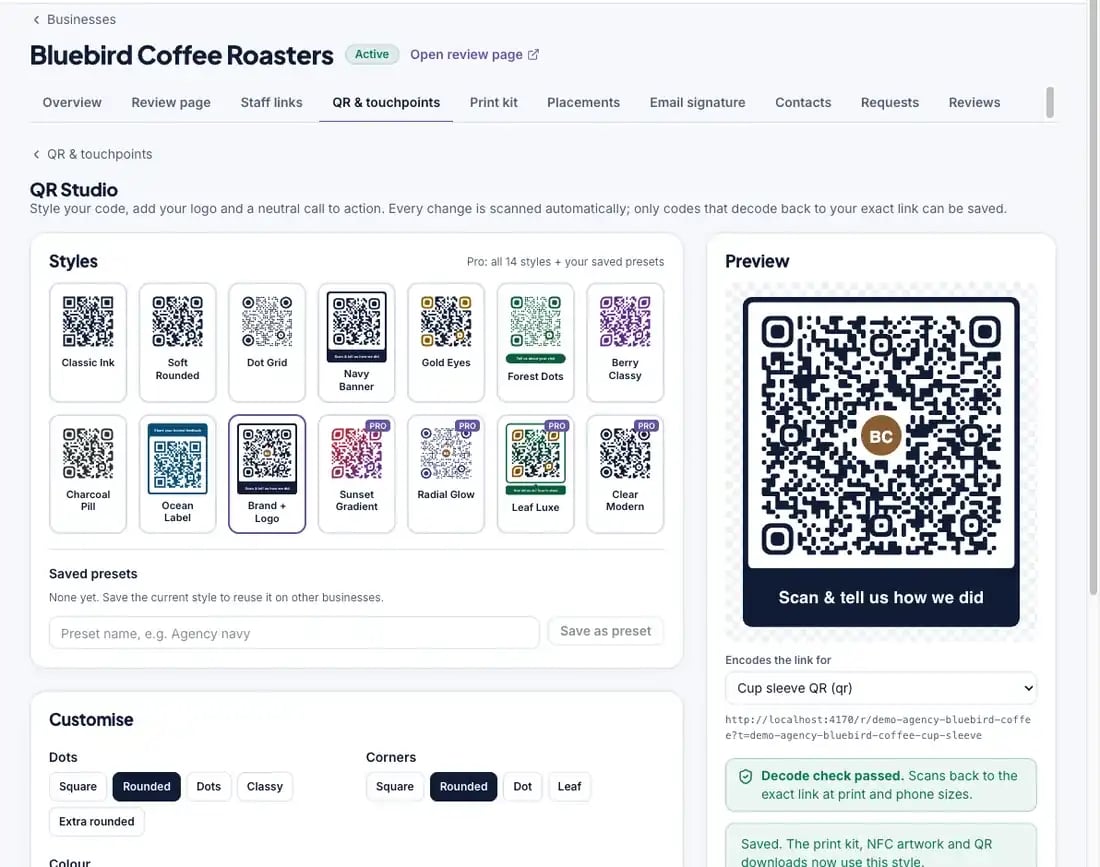
- Scan the final printed QR material and repeat the check from a normal viewing distance.
- Send a request to an address you control and follow the complete journey.
- Confirm who receives feedback and who can approve a reply.
This checklist is our operating guidance. It should be mapped to the controls visible in your account, rather than taken as a claim that every item has a dedicated automated test. The review-page guide explains the score-dependent layouts in more detail.
Set up the people as well as the page
A good handoff tells the business what happens after the first request. Name the person who checks new feedback, the person who approves public replies and the backup when that person is unavailable. Agree on a realistic internal response routine so feedback does not sit unassigned simply because several people assumed somebody else would handle it.
For an agency, separate your responsibilities from the client’s. You may maintain the page and prepare a report, while the client confirms factual details and resolves customer issues. Record those responsibilities in the service arrangement. Software access by itself does not establish permission to speak for the business or promise a remedy to its customers.
Show the owner one complete example of the process using test details under your control. Explain what a reply draft looks like, how it reaches Google and how private feedback is handled. The reply workflow and commercial-use guide help define those responsibilities before the first real customer request.
What to review during the first operating week
Once the setup works, use the first operating period to check consistency. Are staff using the approved materials? Does the correct person notice private feedback? Are draft replies being checked before publication? These observations tell you more about readiness than the time taken to generate the original kit.
If something fails, identify the stage before repeating the whole process. A request that never arrives is a delivery question. A message that opens the wrong page is a destination question. A correct page followed by no customer action is a different issue again. Keep a short record of the symptom, business, date and action taken, without copying unnecessary customer details into support tickets.
At the first report, compare the recorded activity with the actual staff routine and printed placements. The client-report guide explains the limits of scans and review-click counts. If the business needs more sending capacity or follow-up features, use the package breakdown to investigate that specific need rather than changing several parts of the setup at once.
Finish with an owner handoff
Show the owner the live page, the request as received on a phone, the QR destination and the place where private feedback is assigned. Confirm the contact route for an urgent complaint. Save the approved assets and a short list of remaining questions.
Record the starting figures before broader use so the first monthly report has context. A completed setup gives the relevant person a clear next action and a working customer path. Recheck package allowances before adding a second business or enabling paid features.
Common questions
Does setup always take five minutes?
The seller advertises an approximately five-minute guided start. Listing problems, permissions, messaging configuration and output review can add time.
What should I test on my phone?
Check the business identity, QR destination, public and private feedback routes at different scores, and the first request message.
Can an agency set up a client without permission?
Obtain the business owner’s authorization for branding, customer contact and feedback handling before operating the service.
Is a scan-checked QR file enough to approve printed materials?
Check the final printed item as well. Resizing, trimming, contrast and placement can affect how comfortably a customer scans it. Open the resulting destination on a phone and confirm the business, public-review route and private-contact option. The software’s advertised scan check does not replace that final deployment check.
Who should approve the first business setup?
The person authorized by the business should confirm branding, destination links, invitation wording and responsibility for feedback. An agency can prepare the setup, but it should agree who approves public replies and who resolves private complaints. A clear handoff prevents a working page from being mistaken for a fully staffed service.
Sources and verification
Product facts and launch offers checked on November 8, 2026. Seller demonstrations and published terms support the factual descriptions. Practical checklists are our editorial analysis.