
Four ways to display existing feedback
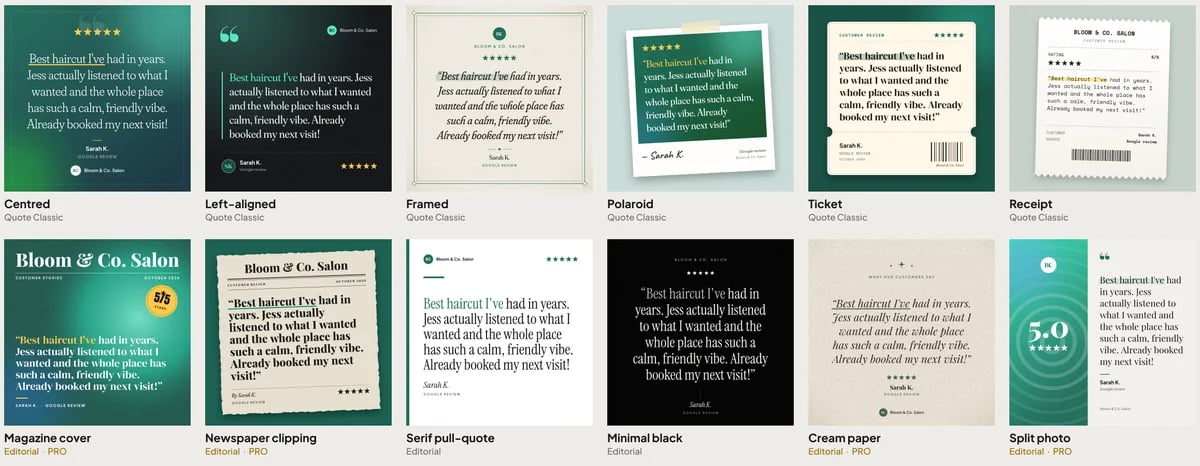
The seller describes a widget gallery, Social Card Studio, Review Stories and public Wall of Love pages. These serve different placements. Widgets live within a website, social cards become image files, stories present review content in a story-style interface, and a Wall of Love creates a page devoted to feedback.
The published description says these formats use real reviews word for word. It separately describes a labelled AI summary on Wall of Love pages. That distinction should remain visible when you assess the output. A generated summary and an individual customer’s quotation have different authorship.
Check the design allowance for your package
The seller advertises 30 widget styles, with 13 styles in Basic and all 30 in Pro. Named examples include a live review counter, trust seal and marquee. Social Card Studio is described as 30 designs in feed, portrait and story sizes, with PNG or ZIP output. Wall of Love pages are described with eight themes, a video strip and share image.
The current overview also places Review Stories in every plan. Confirm which exports, themes and controls appear in the package you choose. The pricing guide helps compare software offers without treating every visual example as a Basic entitlement.
Review accuracy and permission before publishing
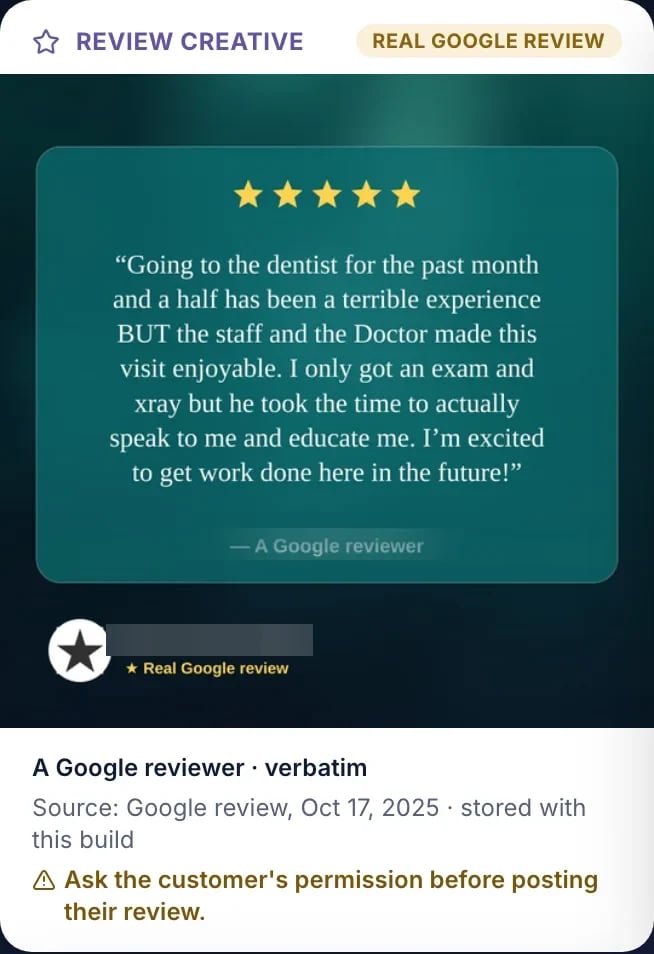
The official review-creative example reminds users to obtain the customer’s permission. Build that check into the publishing process. A review visible on a public listing does not by itself resolve every permission question for republishing it in advertising or on another website.
- Compare the generated card with the original review text.
- Confirm permission for the reviewer’s name, image and quotation.
- Check that cropping has not removed context or changed the meaning.
- Keep an AI summary clearly identified as a summary.
- Check the mobile layout and the link back to the intended business.
The privacy guide provides a broader data and permission checklist.
Choose the format for the reader’s next action
A service page may benefit from one relevant customer account near the service description. A social post needs readable text within the platform’s crop. A dedicated feedback page can hold a wider selection for people already researching the business. These are editorial placement ideas, rather than measured conversion claims.
A large widget library is most useful when it helps the owner select a clear format. It also creates more choices to review. Compare a simple placement with an animated or scrolling one, check small-screen reading, and ensure that important service information remains easy to find.
Match the format to the placement
| Format | Typical use to evaluate | Quality check |
|---|---|---|
| Website widget | Feedback near a relevant service description | Readable text and a layout that leaves the page usable |
| Social card | A customer quote shared as an image | Correct source words, permission and platform crop |
| Review Stories | Browsable review content on a website | Clear navigation and access on a phone |
| Wall of Love | A page collecting feedback about a business or staff member | Context, correct identity and a labeled summary where used |
A suitable format makes a relevant review easier to read. More movement or more designs do not by themselves establish better performance. Choose the simplest treatment that preserves the customer’s meaning and gives the visitor a clear next step.
The full product review explains how these display tools connect with requests, replies and reporting.
An approval process for a social-card batch
Start with a review the business has checked and has appropriate permission to republish. Compare the card’s quotation with the original, including the reviewer identity you intend to show. If the original contains context that changes the meaning, do not remove it just to fit a more attractive layout.
Inspect each exported size rather than approving only one preview. The seller describes feed, portrait and story formats, with PNG or ZIP output. A quotation that is readable in a large preview can become too small in a phone feed or be cropped by a platform placement. Check the actual exported file and keep essential text away from areas likely to be covered by interface controls.
For an illustrative batch, choose one source review, approve its wording and compare a small set of designs before exporting all sizes. That creates a repeatable review step for later content. The permission checklist covers names, images and external tools, while the Magic Build guide considers generated assets as deliverables that still need approval.
Keep published feedback accurate over time
Publishing is not the final check. Agree who revisits a widget or creative when a business changes details, a source review is edited or a permission issue is raised. The public overview does not document a universal automatic refresh or removal process for every export, so ask which placements update dynamically and which require a manual change.
Separate the format’s appearance from claims about the business. A review counter should represent the measure it actually displays. A quotation belongs to its original author. A labeled AI summary is an interpretation of multiple inputs and should not be presented as a customer’s exact words. Review each type according to its own source and purpose.
If a business wants to assess the value of a placement, agree what observation would be useful and which tool can actually measure it. A software screenshot does not establish a conversion lift. The reporting guide explains how to separate observed activity from business outcomes, and the pricing guide keeps design allowances tied to the selected package.
Connect display work to the broader review process
Displaying existing feedback is one part of maintaining a review process. The business still needs a suitable request routine, careful reply approval and a response to private feedback. The email and SMS guide covers invitations, while the AI reply guide covers the owner’s public response.
Read our StarProfits AI review for the overall assessment. Feature counts here reflect the seller material checked on November 8, 2026, ahead of the advertised November 18 public launch. They establish the published offer description, rather than a measured improvement in leads or sales.
Common questions
How many widget styles are advertised?
The seller lists 30 styles overall, with 13 in Basic and all 30 in Pro. Check the current package entitlement before buying.
Does Social Card Studio create customer reviews?
The seller describes cards made from existing real customer reviews. It also reminds users to ask for permission before using a customer’s review in a creative.
Does exporting a social card finish the approval process?
Inspect the actual exported file at the size and placement the business will use. Compare the quotation with the original review, confirm permission and check readability and cropping on a phone. A large editor preview may conceal problems that become apparent in a feed, portrait or story placement.
Do all review displays update automatically?
The reviewed overview does not document one refresh behavior for every widget, page and exported image. Ask which placements are dynamic and which need manual changes when source text, business details or permissions change. A downloaded social image should not be assumed to update just because a website widget can refresh.
Sources and verification
Product facts and launch offers checked on November 8, 2026. Seller demonstrations and published terms support the factual descriptions. Practical checklists are our editorial analysis.